CONTROLLING THE BUTTON AND LEDS
(Extra activity performed by Francesc Capdevila)
Within the transversal project there are two exercises that we have decided to carry out due to their special interest. We have decided to install the Raspberry 4 in our drone and carry out activity 15, which consists of activating some peripherals of the raspberry that can inform us of the status of the internet connection or, for example, the status of the battery or power supply.

I forgot to connect ground wires….!!
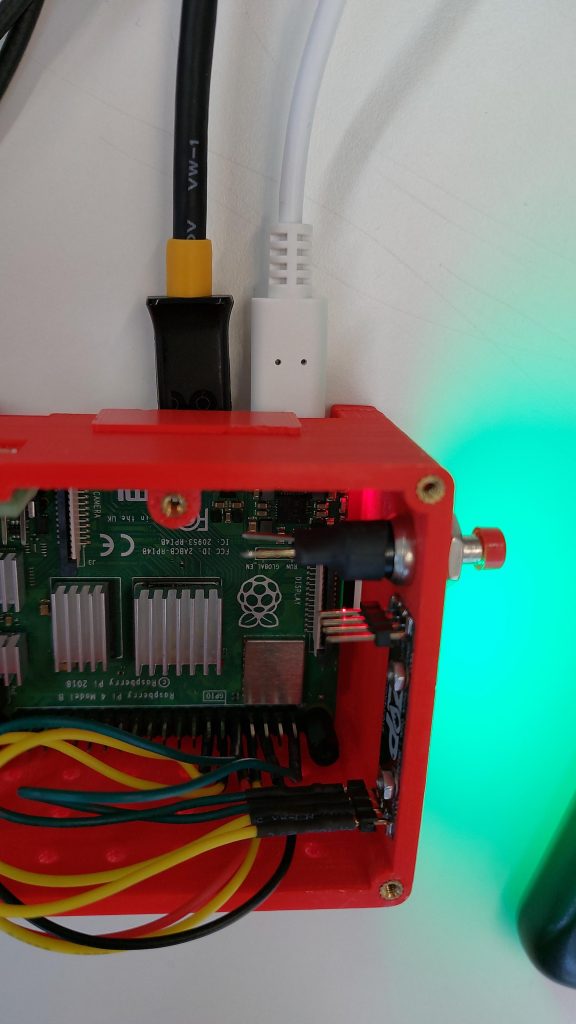
LEDS


Thonny is already installed on the SD, and we have an ex1.py file on the desktop.
The file contains a small script that simply lights up the 5 leds of the raspby in green.The way to run this script every time we turn on the computer is to do a cron job. Cron is a daemon that periodically executes all commands inside the crontab file.When doing crontab -e , it asks us to choose the text editor we like best and then lets us modify the file. We add the order:
reboot sudo python3 /home/pi/Desktop/ex1.py
SCRIPT
from gpiozero import Button
from signal import pause
import board
import neopixel
import time
from gpiozero import LED
def lights() :
for i in range(0, 5) :
#remember RED, GREEN; BLUE, and 255 max value, we can choose a lower one.(0, 255, 0)
pixels [i] = (0, 255, 0)
pixels = neopixel.NeoPixel (board.D18, 5)
lights ()
Which means that every time there is a reboot it runs the script, that is, when it is turned on.
- Cron is a software utility that allows us to schedule tasks on Unix-like systems. The name is derived from the Greek word “Chronos”, which means “time”.Tasks in Cron are defined in a crontab, which is a text file that contains the commands to run. https://pypi.python.org/pypi/python-crontab.
Final Setup
